
Introduction: Your Photos Are Dying
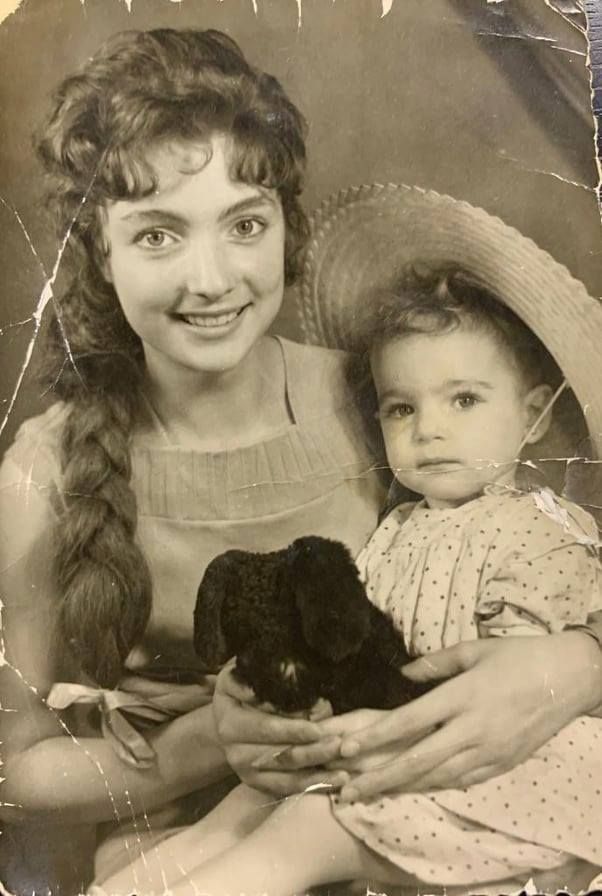
Every day, billions of physical photographs are slowly deteriorating in attics, basements, and old shoeboxes around the world. Scratches deepen, colors fade, and faces become unrecognizable. Time is literally destroying your family history.
The good news? In 2026, you don't need a professional studio or a $600 Photoshop subscription to save them. The best photo restoration app can now do in 10 seconds what used to take an expert 4 hours. But which app actually delivers? We tested the top five to find the best app to restore old photos.
What Makes the "Best" Restoration App?
Before diving into the list, here are the three criteria we used to evaluate every photo restoration app:
Restoration Quality
Does it handle scratches, blur, fading, and tears? Can it produce print-ready results?
Ease of Use
Is it truly "AI Ease" — one tap and done? Or does it require manual editing knowledge?
Privacy & Security
Does it process photos on your device? Or upload your family memories to unknown servers?
FotoRevive — The Best Photo Restoration App
FotoRevive stands out as the best app to restore old photos for one simple reason: it does everything, effortlessly. One tap triggers AI that simultaneously removes scratches, sharpens faces, fixes fading, and even colorizes black-and-white images.
What truly sets it apart is on-device processing — your photos never leave your iPhone. For privacy-conscious users, this is a game-changer. No cloud uploads, no strangers seeing your grandmother's wedding photos.


✅ Pros
- One-tap AI Ease restoration
- On-device processing (maximum privacy)
- Colorization + animation + enhancement in one app
- Free to try, no account required
- HD output ready for printing
❌ Cons
- iOS only (no Android version yet)
- Premium features require subscription
Google PhotoScan
Verdict: Good for capturing glare-free digital copies of physical photos, but lacks AI restoration features.
PhotoScan is excellent at what it does: removing glare from glossy prints using multiple captures. But it doesn't fix scratches, sharpen faces, or colorize. It's a scanner, not a restorer. If your photos are in good condition and you just need to digitize them, it's a solid free choice.
✅ Pros
- Completely free
- Anti-glare scanning technology
- Google Photos integration
❌ Cons
- No AI restoration or repair
- No colorization or enhancement
- Photos uploaded to Google's cloud
Remini
Verdict: Popular for face enhancement but aggressive upselling and sometimes "over-processed" results.
Remini excels at one thing: making blurry faces look sharp. It's popular on social media for that "wow" factor. However, non-facial areas often look untouched or artificially smooth. The free version is heavily limited, and the subscription cost adds up quickly.
✅ Pros
- Excellent face sharpening
- Popular with large user base
- Available on iOS and Android
❌ Cons
- Expensive subscription ($9.99/week)
- "Fake" look on non-facial areas
- Cloud processing (privacy concern)
Photomyne
Verdict: Great for digitizing entire albums at once, but restoration quality is average.
Photomyne's killer feature is batch scanning — point your camera at an album page and it detects and crops individual photos. For genealogy projects with hundreds of photos, this saves hours. However, its AI restoration is basic compared to dedicated restoration apps.
✅ Pros
- Batch album scanning
- Auto-detect multiple photos per page
- Built-in photo organization
❌ Cons
- Basic restoration quality
- Subscription required for most features
- Cloud-based storage
Adobe Photoshop Express
Verdict: Powerful editing tools, but too complex for users who just want to fix old photos quickly.
Adobe's mobile app brings some desktop Photoshop features to your phone, including basic healing and enhancement tools. But there's no one-tap "fix old photo" button. You need to manually adjust settings, apply filters, and clone-stamp scratches. For users seeking the best photo restoration app experience, it's overkill.
✅ Pros
- Powerful manual editing tools
- Adobe ecosystem integration
- Fine-grained control
❌ Cons
- No one-tap AI restoration
- Steep learning curve
- Requires Adobe subscription for full features
Bonus: AI Colorization Comparison
One feature that separates the best photo restoration app from the rest is AI colorization. Here's what FotoRevive's colorization looks like:


How to Choose the Right App
📱 If you want one-tap simplicity + privacy
Choose FotoRevive. It's the best photo restoration app for users who want professional results without the complexity.
📸 If you just need to scan (not restore)
Choose Google PhotoScan for glare-free digitization of photos in good condition.
👤 If you only care about face sharpening
Choose Remini — but be prepared for the subscription cost.
📚 If you need to digitize an entire album
Choose Photomyne for batch scanning, then use FotoRevive for the actual restoration.
Conclusion
After testing all five apps across dozens of damaged photos — from mildly faded to severely scratched — FotoRevive consistently delivered the best balance of quality, speed, and privacy. It's the best app to restore old photos in 2026 for anyone who values their time and their family's privacy.
The other apps each have their niche, but none offer the complete package that FotoRevive does: one-tap restoration, colorization, face enhancement, photo animation, and on-device processing — all in a single, beautiful app.
Also read: AI Ease Photo Restoration: How to Auto Restore Old Photos | Why an App is Better Than a Restoration Service
Ready to Restore Your Memories?
Download the best photo restoration app and bring your old photos back to life — free.
Download on the App Store