
Introduction
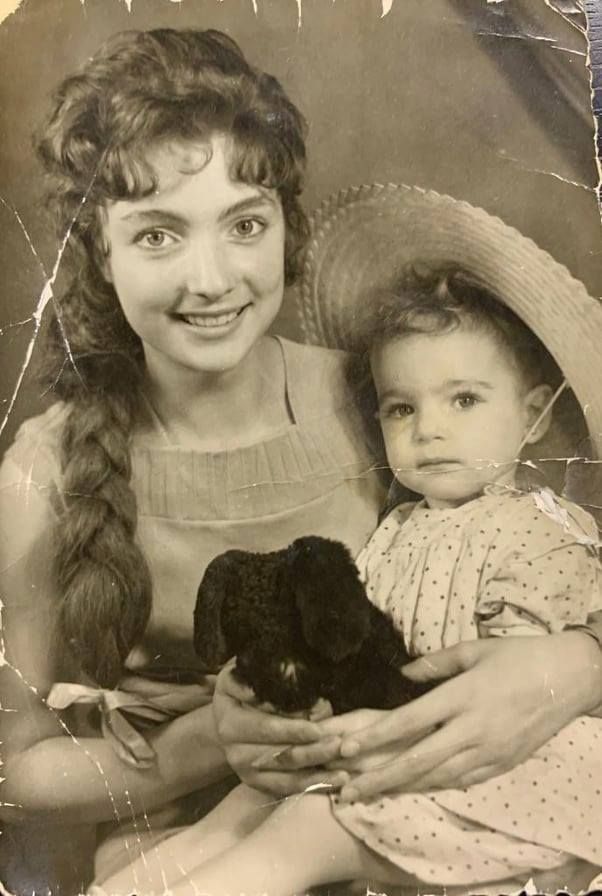
For decades, "restoring an old photo" meant sitting at a desktop computer with expensive photo restoration software like Adobe Photoshop, spending hours manually painting over scratches and adjusting color curves. It was a skill that took years to learn.
But the game has changed dramatically. In 2026, your smartphone has more AI processing power than the laptops of five years ago. Modern AI apps can analyze and restore a damaged photo in seconds — no Photoshop skills required. So the real question is: is traditional photo restoration software still the best choice?
The Problem with Traditional Desktop Software
If you're searching for the best photo restoration software, you'll find options like Photoshop, GIMP, and Luminar. They're powerful — but they come with significant baggage:
High Cost
Adobe Photoshop costs $22.99/month ($275.88/year). That's a serious investment just to fix a handful of family photos. Even "one-time purchase" alternatives like Luminar cost $79+.
Steep Learning Curve
Clone stamp? Healing brush? Layer masks? Frequency separation? These tools are powerful, but they require hours of YouTube tutorials before you can fix a single scratch. Most people give up before finishing their first photo.
Hardware Requirements
Photoshop recommends 16GB RAM and a dedicated GPU. If you're on an older laptop or a basic computer, the software will crawl — or won't even install.
Time Per Photo
Even for a skilled editor, manually restoring one moderately damaged photo takes 30-60 minutes. For a shoebox of 50 family photos? That's a full work week.
Why AI Apps Are the New "Best Software"
Here's why more people are choosing mobile AI apps over traditional photo restoration software:
- Convenience: Scan the physical photo and restore it on the same device. No scanner, no file transfer, no computer needed.
- AI Power: Modern neural networks trained on millions of images can detect and fix damage patterns that even skilled humans miss. The AI "sees" what the photo should look like.
- Speed: What takes 45 minutes in Photoshop takes 10 seconds in an AI app. That's not an exaggeration — it's a measured reality.
- Price: Most AI apps offer free trials and subscriptions under $10/month — a fraction of desktop software costs.
- Privacy: Apps like FotoRevive process entirely on-device, meaning your photos never leave your phone. Desktop software that uses cloud-based AI (like some Photoshop features) actually has worse privacy.
Head-to-Head: Photoshop vs. FotoRevive
Let's compare the most popular traditional photo restoration software with the leading AI app:
| Feature | Adobe Photoshop (Desktop) | FotoRevive (AI App) |
|---|---|---|
| Cost | $22.99/month ($275/year) | Free to try, affordable subscription |
| Time per Photo | 30–60 minutes (manual) | 10 seconds (AI-powered) |
| Learning Curve | Hours to weeks | Zero — one-tap operation |
| Scratch Removal | ✅ Manual (clone stamp) | ✅ Automatic AI detection |
| Colorization | ❌ Manual painting only | ✅ One-tap AI colorization |
| Photo Animation | ❌ Not available | ✅ Built-in face animation |
| Privacy | ⚠️ Cloud features upload data | ✅ 100% on-device processing |
| Hardware Required | Modern PC/Mac, 16GB RAM | Any iPhone with A12+ chip |
| Fine Control | ✅ Pixel-level editing | Limited manual adjustment |
| Best For | Professional photo editors | 99% of everyday users |
The Verdict
For 99% of users who just want to fix their family photos, a modern AI app is the best photo restoration software choice. Photoshop is overkill — like using a Formula 1 car to drive to the grocery store.


How to Turn Your Phone into a Restoration Station
Here's how to use FotoRevive — the best photo restoration software alternative — in three easy steps:
Scan or Import
Take a photo of your old print with your iPhone camera, or import a saved scan from your photo library. FotoRevive handles both.
Tap "Restore"
One button. The AI analyzes the image, detects scratches, blur, fading, and tears — then fixes everything simultaneously. No manual selection needed.
Save or Share
Download the HD result to your camera roll, share it with family, or print it. The restored photo is yours — no watermarks on saved files.


When Should You Still Use Desktop Software?
To be fair, there are some scenarios where traditional photo restoration software still has an edge:
- Professional photo editors who need pixel-perfect control for client work.
- Extremely complex restorations — like missing faces or large torn sections that require creative reconstruction.
- Batch processing with custom settings — if you need to apply identical manual adjustments to hundreds of photos.
But for the vast majority of people who have a box of old family photos and just want them to look good again? An AI app is not just "good enough" — it's often better.
Related reading: Photo Restoration Program vs. Professional Service: What's the Difference? | 5 Best Free Tools to Fix Older Photos
Conclusion: Don't Get Stuck at a Desk
The search for the best photo restoration software used to end at an expensive desktop application. In 2026, it ends in your pocket. AI-powered apps like FotoRevive deliver professional-quality results in seconds, protect your privacy, and cost a fraction of traditional software.
Stop spending hours at your computer wrestling with clone stamps. Download FotoRevive and restore your memories in seconds — from anywhere.
Your Phone Is the Best Restoration Tool
Turn your iPhone into a professional photo restoration studio. Try FotoRevive free today.
Download on the App Store